Guides
Static vs Dynamic QR Codes: Why Free QR Codes Stop Working
A QR code on your menu, flyer or van can stop working without anything being wrong with the print. Here is why that happens, how to check a code in ten seconds, and how to make one that keeps working for as long as your website does.
You print 500 table cards with a QR code for the menu. It works for weeks. Then one evening a customer holds up their phone: the code opens a page asking you to upgrade your plan, or an error, or nothing at all.
The printer didn’t make a mistake. The code was never really yours. It was a dynamic QR code, and it was quietly depending on someone else’s server the whole time.
The short answer
There are two kinds of QR code:
- A static QR code stores your link (or WiFi details, or contact card) inside the pattern. A phone reads it directly. Nothing in between can switch it off, so it works for as long as the link itself works.
- A dynamic QR code stores a short link to the QR provider’s server. When someone scans it, that server forwards them to your page. If the server stops forwarding, because a trial ended, a payment failed or the company changed its plans, every printed copy stops working at once.
QR Code Generator (QRCG, now part of Bitly), one of the biggest names in the business, says it plainly on its own blog: the dynamic redirect “runs on your provider’s servers, so it depends on an active plan to keep routing scans to your page.” It adds that what sometimes fails is “a paid dynamic redirect for a lapsed subscription, a scan limit on a Dynamic QR Code, or a broken destination URL.”
Why “free” codes are often dynamic
Many QR websites let you design a code for free, then make it dynamic by default. It’s a reasonable business: the code works, you print it, and when the trial is over the code needs a subscription to keep working. Some providers pause dynamic codes the day a trial ends, others after a grace period, and some cap the number of free scans.
It isn’t a rare problem. Uniqode, which sells dynamic QR codes, reports in its State of QR Codes 2026 that 29% of consumers have run into expired or dead QR code links. That figure covers all causes, not just subscriptions, but it shows how often people scan a code and get nowhere. Uniqode’s own troubleshooting guide puts the subscription case first: a dynamic code stops working “when the account owner lets the subscription lapse or pauses the campaign.”
And printed codes live a long time. Scanova, another QR vendor, analysed more than 40,000 live codes on packaging, in hotels and in restaurants in 2026: the average active code was 2.4 to 2.6 years old, and the oldest were still being scanned after 8 to 10 years. That’s a long time to keep paying for a redirect, or to hope a company is still around.
Static QR codes have no such switch. The QR code itself was released by Denso Wave in 1994, and the company declared that it would not exercise its patent rights, so anyone can make and read the codes at no cost. Your phone doesn’t need anyone’s permission to read one.
Check any QR code in ten seconds
You don’t need special software. Point your phone camera at the code and read the link it shows before you tap it:
| What the phone shows | What it means |
|---|---|
Your own website, e.g. yourcafe.com/menu |
Static. It works as long as that page exists |
| A short link on a QR company’s domain | Dynamic. It depends on that company and your account |
WIFI: details or “Join network” |
Static WiFi code. It works until you change the password |
| “Add contact” with a name and number | Static contact card (vCard) |
If you find a dynamic code on something you’ve already printed, don’t panic. Note the provider, check your account’s status and renewal date, and plan a replacement on your next print run.
“But I want to change the link later”
That is the honest reason people choose dynamic codes, and it’s a fair one. Menus change, campaigns end, websites get rebuilt. The way to keep that flexibility without renting it is simple:
- Make a static code that points to a short page on your own domain, such as
yourcafe.com/menuoryourshop.com/qr. - When things change, update that page, or set a redirect on your website from that address to the new one.
You get the same “change it any time” freedom, with no subscription and no third party between your customers and your site. The only thing you must keep paying for is your own domain name, which you’re paying for anyway.
“But I want to count scans”
You can do that without a dynamic code too. Add tracking tags to the link before you make the code, for example:
yourcafe.com/menu?utm_source=qr&utm_medium=print&utm_campaign=table-cards
Every scan then appears as a visit in your own analytics (Google Analytics, for instance) under source “qr”. Our
UTM builder puts the tags together so you don’t mistype them. Use a different utm_campaign for the
flyer, the van and the table cards, and you’ll see which one actually works.
The hidden cost of long links
There is one catch with tracking tags: the more text you put in a code, the denser the pattern gets. We ran four typical contents through the same QR engine our generator uses, at the default error correction (M):
| What’s in the code | Characters | Pattern size | Each square on a 2 cm code |
|---|---|---|---|
| A short link | 21 | 25 × 25 | 0.61 mm |
| A menu page link | 38 | 29 × 29 | 0.54 mm |
| WiFi login for a guest network | 50 | 33 × 33 | 0.49 mm |
| A menu link with five UTM tags | 114 | 45 × 45 | 0.38 mm |
The last column includes the blank margin of four squares that the QR standard asks for on each side.
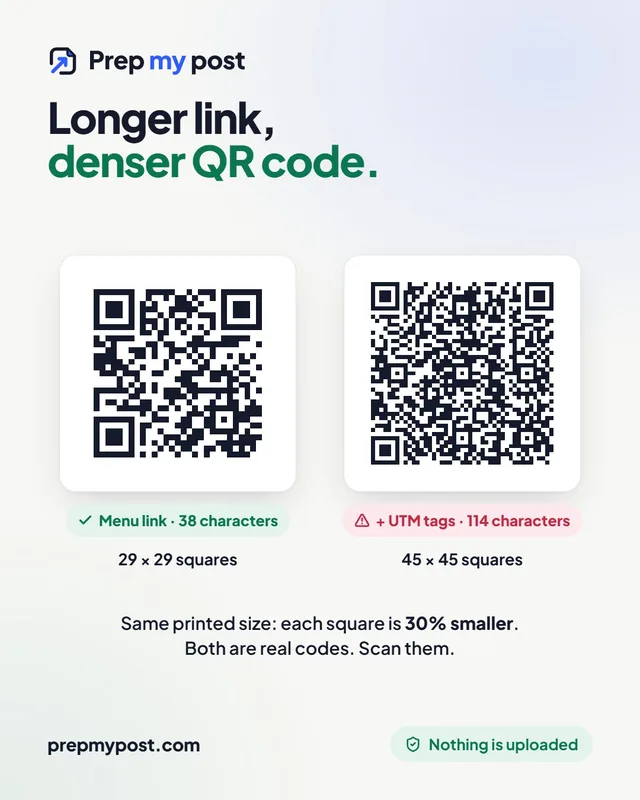
At the same printed size, the long tracking link makes every square about 30% smaller than the plain menu link. Small
squares are harder to read in dim restaurants, at an angle, or with an older phone. Two easy fixes: keep your tags
short (utm_campaign=tables rather than table-cards-2026-autumn), and print the code bigger.
Error correction: why a logo in the middle still scans
QR codes repeat part of their data so they can be read even when some of the pattern is missing. There are four levels:
| Level | Share of the code that can be damaged or covered |
|---|---|
| L | about 7% |
| M | about 15% (the most common choice) |
| Q | about 25% |
| H | about 30% |
A logo in the centre “damages” the pattern on purpose, which is why our QR code generator switches to level H automatically when you add one. Higher levels make the pattern denser, though. With a logo, the menu link from the table above grows from 29 × 29 to 37 × 37. So use H only when you need it.
Our generator also runs a scan test in your browser after every change. It shrinks and slightly blurs the code the way a quick phone photo would, and warns you if it can’t read it back.
A checklist before you print
- Scan the final file, not just the preview, on at least two phones (an iPhone and an Android).
- Dark code on a light background. Inverted or low-contrast colours are the most common reason a styled code fails.
- Keep the margin. Leave clear space around the code; don’t let text or a border touch it.
- Use SVG for print. It’s a vector file, so it stays sharp on a poster or a van. Use PNG for screens and documents.
- Point it at a page you control, and keep that page alive for as long as the print is out there.
- Need many codes? Tables, rooms or products: the bulk QR code generator makes up to 1,000 at once from a list, each with its own label.
Scanning safely
The flip side of “anyone can make a QR code” is that scammers can too. The US Federal Trade Commission warns about fake codes stuck over real ones on parking meters, and advises: “If you see a QR code in an unexpected place, inspect the URL before you open it.” That habit, reading the link first, is the same one that tells you whether a code is static or dynamic. If you run a business, check your own public codes now and then for stickers on top.
Making codes here
Our generators make static codes only: links, WiFi logins, contact cards and bulk lists. They’re made by your browser on your device. Links, WiFi passwords and contact details aren’t sent to us, and there’s no account, watermark or scan limit.
The short version
- Static QR codes store your content in the pattern and never expire. Dynamic codes depend on a provider’s server.
- Scan a code and read the link: your own domain means static; a QR company’s short link means dynamic.
- To change the destination later, point a static code at a page on your own website and update that page.
- To count scans, add short UTM tags. Long links make the pattern denser, so print bigger or trim the tags.
- Nothing is uploaded, your data stays yours, and you’re in control.
QR Code is a registered trademark of DENSO WAVE INCORPORATED. QR Code Generator, Bitly, Uniqode and Scanova are trademarks of their owners; PrepMyPost is independent and not connected to them. Sources: Denso Wave QR code history; KEYENCE QR code basics (error correction levels); QRCG by Bitly blog (August 2026); Uniqode QR troubleshooting guide (April 2026); Scanova, “Do QR Codes Expire?” (2026); US FTC consumer alert (December 2023). Pattern sizes measured with the QR engine our generator uses.
Frequently asked questions
Do QR codes expire?
A static QR code never expires: the link or text is stored in the pattern itself. A dynamic QR code holds a short link to the provider's server, and it stops working if that server stops forwarding it, for example when a trial ends or a subscription lapses.
How can I tell if my QR code is static or dynamic?
Scan it and look at the link your phone shows before you open it. If it is your own website, the code is static. If it is a short link on a QR company's domain, the code is dynamic and depends on that company.
Can I fix a printed QR code that stopped working?
If it is a dynamic code, renewing the subscription with the same provider usually brings the redirect back. If you don't want to pay, you have to print a new code. Make the new one static and point it at a page on your own website.
Can I change where a static QR code points?
Not the code itself, but you can change the page it opens. Point the code at a page on your own domain, such as yoursite.com/menu, and update or redirect that page whenever you need to.
Can I track scans without a dynamic QR code?
Yes. Add UTM tags to the link, for example utm_source=qr and utm_medium=print, and the scans show up as visits in your own analytics, such as Google Analytics.