How it works
remove.bg Is Closing on 1 December: How to Keep Removing Backgrounds for Free
remove.bg is moving into Canva, and its standalone website is reported to close on 1 December 2026. Here is what is confirmed, what to sort out before the date, and the free options that already sit on your phone or computer.
If you’ve used remove.bg for years, the news probably landed in your inbox or in a tweet: the website that made “remove background” a one-click job is going away as a standalone service. Its background removal is moving into Canva.
This article sticks to what is actually known, what to do before the date, and how to keep cutting out photos without paying or signing up for anything new. We’ll mention our own free tool at the end, but most of the options below aren’t ours, and several are already on the device you’re reading this on.
What is confirmed, and what is only reported
remove.bg’s own FAQ now opens with one line: remove.bg is moving to Canva. It says the company is “migrating remove.bg’s background removal functionality into the Canva platform”. Canva has owned remove.bg’s maker, Kaleido, since 2021, so the move isn’t a surprise.
The date comes from news coverage rather than from a page we could read on remove.bg itself. AlternativeTo reported in September 2026 that remove.bg “will discontinue its standalone website on December 1, 2026”. Several other outlets repeat the same date, and some add that the API moves to Leonardo.ai, another Canva company. We couldn’t find that API detail on an official page, so treat it as reported, not confirmed.
| Status | |
|---|---|
| Background removal moves into Canva | Confirmed on remove.bg’s FAQ |
| Standalone website closes 1 December 2026 | Reported (AlternativeTo and others, citing the FAQ) |
| API moves to Leonardo.ai | Reported only |
| What happens to leftover pay-as-you-go credits | Not stated on the pages we checked: ask support |
Before 1 December: a short checklist
- Use your credits. remove.bg’s help centre says subscription credits expire at the end of each billing period, and credits left after you cancel expire too. If you bought a pay-as-you-go pack, spend it on the photos you’d want at high resolution while you still can.
- Cancel or check renewals. If you’re on a monthly plan, look at the next renewal date. A charge on 28 November for a service that closes on 1 December is easy to miss.
- Save your finished files. Anything you processed and only kept in a browser tab or a download link should be saved somewhere you control.
- Find the places that call the API. Shop plugins, Zapier flows, design scripts, a Photoshop or Figma plugin: if something in your workflow sends images to remove.bg automatically, it is the part most likely to break quietly. Make a list now.
- Ask support about refunds, in writing, before the date. That’s where the official answer for your account will be.
How much resolution were you really getting for free?
This is worth knowing before you choose what to use next. remove.bg’s help centre says the free website result was up to 0.25 megapixels, with higher resolutions (up to 50 megapixels) on paid plans.
0.25 megapixels sounds abstract, so here is what it means for an ordinary phone photo:
| Pixels | Share of a 12 MP photo | |
|---|---|---|
| A 12-megapixel phone photo (4000 × 3000) | 12,000,000 | 100% |
| Free preview at 0.25 MP (about 577 × 433) | about 250,000 | about 2% |
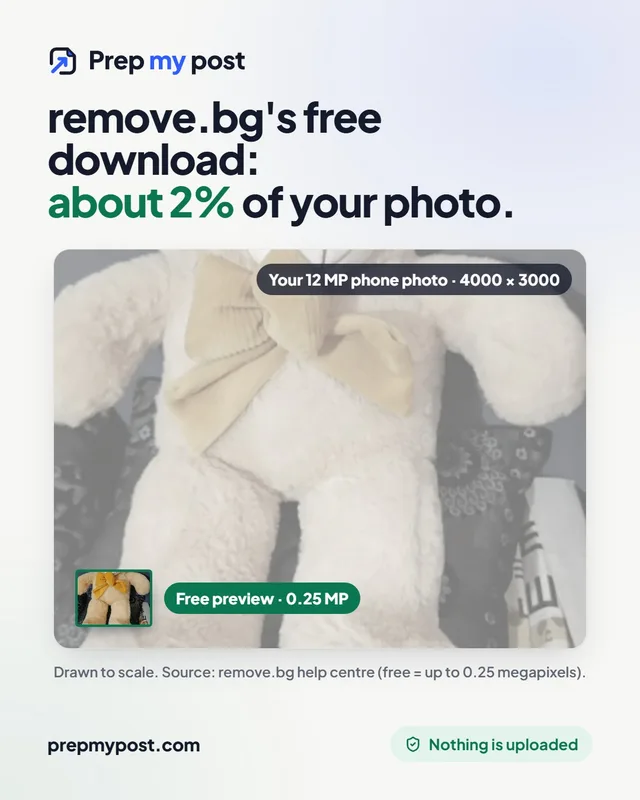
In other words, the free download had roughly one forty-eighth of the pixels your phone captured. That is fine for a profile picture or a quick chat sticker. It is too small for a product photo (Amazon asks for at least 1,000 pixels on the longest side if you want zoom), a printed flyer or a slide on a big screen.
So when you compare replacements, the question isn’t just “is it free?” but “free at what size?”
Free options that are already on your device
You may not need a website at all. Recent phones and computers have background removal built in, and it all works on the device.
| Device | How to do it | Good for |
|---|---|---|
| iPhone / iPad (iOS 16 or later) | Open the photo in Photos, touch and hold the subject, then choose Copy or Share | Quick stickers and chat images |
| Mac (macOS Sonoma or later) | Open the image in Preview, then Tools → Remove Background | Fast PNG cut-outs on a Mac |
| Samsung Galaxy (One UI 5.1 or later) | In Gallery, touch and hold the subject, then Copy as image or Save as image | Quick cut-outs on Android |
| Windows 11 | Open the image in Photos or Paint and choose Remove background | Simple shapes and clear subjects |
These are good, fast and private. What they usually don’t give you is control over the result: a white or coloured background, a blurred version of the original, product sizes for marketplaces, or a check of the edges on different colours. They also differ a lot between devices and versions, so a cut-out from one phone may look different from a colleague’s.
Other online removers, and what their free plans give you
If you’d rather stay with a web or app service, here is what the free plans of the best-known names say about themselves, taken from their own pages in October and November 2026. Plans change often, so check before you commit.
| Service | Free plan, in its own words | Account needed |
|---|---|---|
| Canva (remove.bg’s new home) | Background Remover sits in the Canva editor. Check whether your plan includes it before 1 December | Yes |
| Adobe Firefly / Adobe Express | “Free daily generations” you can use to remove backgrounds; unlimited use on a paid plan; JPG, PNG or WebP up to 50 MB, downloaded as PNG | Yes, an Adobe ID |
| Photoroom | Free exports up to 2000 × 2000 px in the web app, 2400 × 2400 on iPhone and 4032 × 4032 on Android | Yes |
| PrepMyPost (ours) | Full resolution, no daily limit, no watermark; runs on your device, so nothing is uploaded | No |
All three need you to sign in, and most online removers do the work on their own servers. That’s not wrong, but if the photo shows a person, a document or a product that hasn’t launched, read the service’s privacy policy to see where your photo goes and how long it’s kept.
A browser-based remover: the closest like-for-like swap
If what you liked about remove.bg was open a web page, drop a photo, download, the closest replacement is a remover that works the same way in the browser but runs the AI on your own device instead of on a server.
That changes two things that matter here:
- No upload. The photo is opened and processed on your phone or computer. You can check it: after the first photo, switch on airplane mode and do another one. It still works.
- Full resolution costs nothing. Your device does the work, so there’s no reason to give you 2% of the pixels for free and charge for the rest.
Our own free remove.bg alternative works this way. On computers with a recent graphics card it uses BiRefNet, an open-source model built for fine detail such as hair. Other computers get a quicker model, with a “Sharper edges (HD)” button for the full one. On our 4-core test PC without a fast graphics card, the quick model takes about 7 seconds a photo and HD about 45 to 50 seconds. Phones get a light 5 MB model so the page doesn’t freeze. The model downloads once and stays in your browser.
The steps are the ones you already know:
- Open the background remover.
- Drop a photo (JPG, PNG or WebP).
- Wait a few seconds the first time while the model loads.
- Choose transparent, white, a colour or blur, and download at your photo’s full size.
For specific jobs there are ready-made versions: a transparent PNG maker for logos and slides, and product photos on white sized for Amazon, Etsy, Shopify and eBay, with every size in one ZIP.
If you used the API
A browser page can’t replace an API: there’s no endpoint to call. If a shop or app sends images to remove.bg automatically, your realistic choices are to move to whatever remove.bg and Canva offer for developers, to switch to another paid API, or to run an open-source model such as BiRefNet on your own server. The last option needs some engineering, but the model is MIT-licensed and you won’t owe anyone credits.
Whatever you pick, test it on 20 or 30 of your real photos before the date, including the awkward ones: hair, glass, white products on white tables. Averages from someone else’s test set won’t tell you much.
The short version
- remove.bg’s FAQ confirms the move into Canva; the 1 December 2026 closing date comes from news reports.
- Before the date: use your credits, check renewals, save your files and find any automation that calls the API.
- The free remove.bg download was up to 0.25 megapixels, about 2% of a 12 MP phone photo.
- iPhone, Mac, Samsung and Windows 11 all remove backgrounds on the device for free.
- For the same drop-and-download workflow at full resolution, use a browser-based remover. Nothing is uploaded, your data stays yours, and you’re in control.
remove.bg, Canva, Leonardo.ai, Adobe, Adobe Firefly, Adobe Express and Photoroom are trademarks of their owners. PrepMyPost is independent and not connected to them. Sources: remove.bg FAQ and help centre; AlternativeTo (September 2026); Adobe Firefly background remover page; Photoroom help centre, “Image resolution limits for exports” (22 September 2026).
Frequently asked questions
Is remove.bg shutting down?
remove.bg's own FAQ says its background removal is being migrated into the Canva platform. News reports, citing that FAQ, say the standalone remove.bg website closes on 1 December 2026. Check remove.bg's FAQ for the latest details.
What happens to my remove.bg credits?
remove.bg's help centre says subscription credits expire at the end of the billing period, including after you cancel. For pay-as-you-go credits and refunds at closure, check remove.bg's own FAQ and support before 1 December 2026, and use any credits you have left before then.
Can I still remove backgrounds for free after remove.bg closes?
Yes. iPhone, Mac, Samsung Galaxy phones and Windows 11 have background removal built in, and browser-based removers such as PrepMyPost's run the AI on your own device, so they are free at full resolution with no upload.
Is PrepMyPost connected to remove.bg or Canva?
No. PrepMyPost is an independent free tools site. remove.bg and Canva are trademarks of their owners and are named here only to describe the change.
What resolution did the free remove.bg give?
According to remove.bg's help centre, the free website output was up to 0.25 megapixels, about 577 × 433 pixels for a 4:3 photo. Higher resolutions, up to 50 megapixels, needed a paid plan or credits.