Privacy
Do Online Tools Upload Your Files? How Browser-Based Tools Keep Them Private
Most free tools send your photo or document to a server to process it. Browser-based tools do the work on your own device instead. Here is the difference, what it means for your privacy, and a two-minute test you can run on any tool.
You find a free tool, drop in a photo of your product, your passport scan or a contract, and a few seconds later you download the result. It feels like the work happened on your screen. Usually it didn’t: your file travelled to a company’s server, was processed there, and the result was sent back.
That isn’t always a problem. But it is worth knowing where your file goes, because once it has left your device, you are relying on someone else’s promise about what happens to it next.
How most online tools work: your file goes to their server
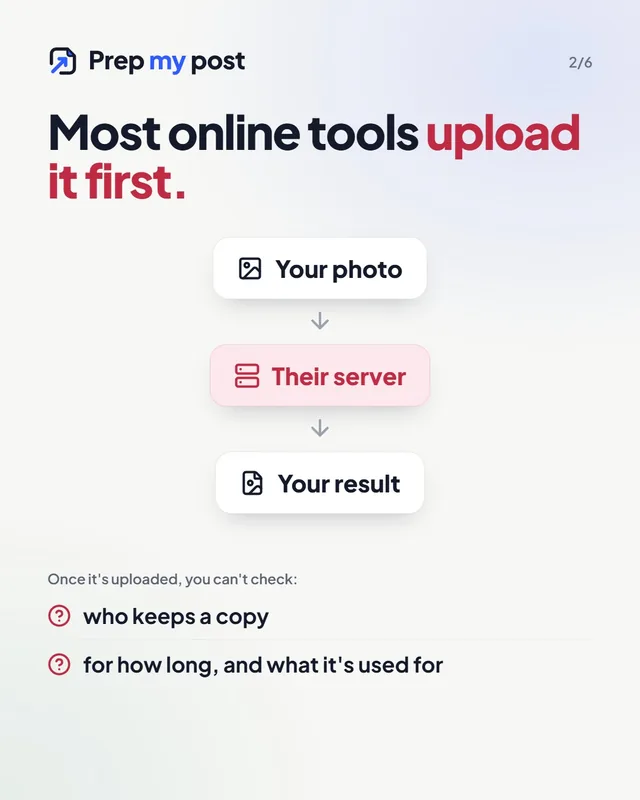
A typical online image editor, PDF converter or background remover works like this:
- You choose a file. Your browser uploads it to the company’s server.
- The server processes it: resizes it, removes the background, converts it to PDF.
- You download the result from the server.
The file now exists on a computer you don’t control. What happens next depends on that company’s privacy policy: some delete files after an hour, some keep them longer, some may use them to improve their products, and some say little at all. Even with good intentions, a copy that exists can be leaked, logged or kept by mistake.
For a holiday photo that may not matter. For an ID card, a signed document, a client’s invoice, an unreleased product or a photo of your children, it might.
How browser-based tools work: the tool comes to you
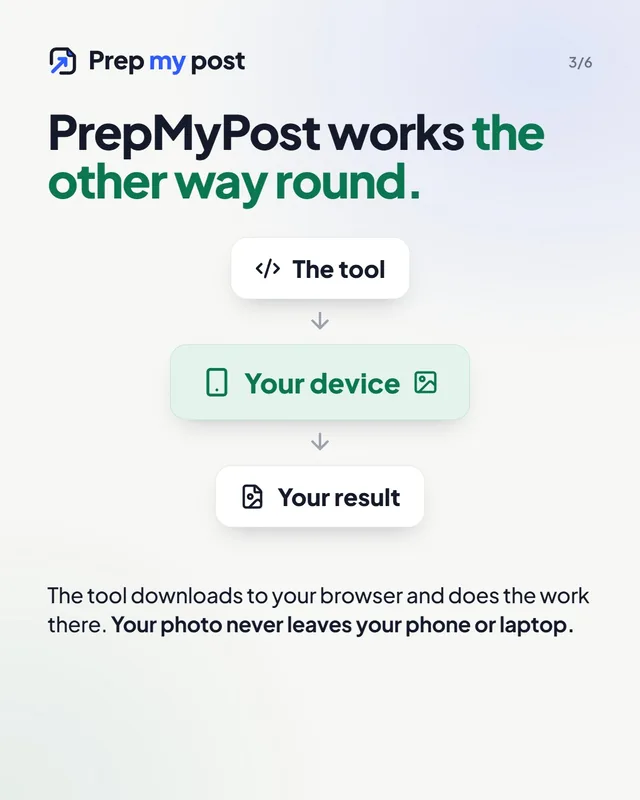
A browser-based tool turns this around. Instead of sending your file to the program, the program is sent to you:
- When you open the page, your browser downloads the tool’s code, just like any web page.
- You choose a file. It is opened by your browser, on your device.
- The work happens on your own processor (and graphics card, for AI tools).
- The result is saved straight from your browser to your device.
Your file is never part of any request to a server. Modern browsers are powerful enough to do this for most everyday jobs: resizing and compressing photos, converting images, making PDFs, generating QR codes, counting text, and even running AI models.
Every PrepMyPost tool works this way. Photos you resize, backgrounds you remove, documents you make and text you count are processed on your own device and never sent to our servers or anyone else’s.
What this means in practice
| Server-based tool | Browser-based tool | |
|---|---|---|
| Where your file goes | Uploaded to the company’s server | Stays on your device |
| Who could keep a copy | The company, its hosting provider, anyone who breaches them | Only you |
| Works offline once loaded | No | Yes |
| Speed on slow internet | Slow: the file has to travel both ways | Not affected: nothing is uploaded |
| File size limits | Often, to save server costs | Only what your device can handle |
| Speed on an old device | Not affected | Heavy jobs (like AI) can be slower |
Browser-based tools aren’t magic. Very heavy jobs, such as removing a background with a large AI model, run faster on a powerful server than on a five-year-old phone. We handle that by giving phones a lighter AI model and offering a sharper “HD” option on computers. You get to choose the trade-off, without giving up your file.
Check it yourself in two minutes
You don’t have to take anyone’s word for it, including ours. Here are two tests that work on any website.
1. The airplane mode test (easy). Open the tool and let the page load completely. Then switch on airplane mode or turn off your Wi-Fi, and use the tool. If it still works, your file couldn’t have been uploaded, because there was no connection to upload it over. On PrepMyPost, every tool that works on your files passes this test. For the background remover, run it after your first photo, once the AI model has been saved. (The name checkers are the exception, because looking up whether a name is taken needs the internet. More on them below.)
2. The network test (more detail, on a computer). Press F12 (or right-click → Inspect) to open your browser’s developer tools and choose the Network tab. Now use the tool. Every request your browser makes appears in the list. An upload shows up as a request whose size is roughly the size of your file. With a browser-based tool, you won’t see one.
Exactly what our site does send and receive
“Nothing is uploaded” should be literally true, so here is the full picture:
- Page and tool code. Your browser downloads our pages from Cloudflare, our hosting provider. Like every website’s host, Cloudflare processes technical data such as your IP address to deliver the site and protect it from abuse.
- The AI model for the background remover tools. It downloads once from our own website (5 MB on phones, about 47 MB for the quick model on computers, about 75 MB for the full model) and is saved in your browser. The AI engine’s code comes from jsDelivr, a public content network. These are downloads of program files only: your photo is not part of any request.
- Name checkers. To tell you whether a domain or username is free, the domain name checker has to ask the services that know. Your browser sends only the name you typed, directly to domain registries and to GitHub, GitLab and Bluesky, never through our servers.
- Analytics, only if you agree. If you click “Accept” in the cookie banner, Google Analytics counts which pages are visited. It never receives your photos, files, text or results. If you click “Reject”, it doesn’t load at all.
Some things are saved in your browser so you don’t lose work, such as your counter draft or your invoice details. They stay on your device, and each tool has a button to delete them. The privacy page lists every one and has a single button to delete them all.
Your photos carry more than you think
Even when a tool is private, the photo itself might not be. Photos taken on a phone usually contain hidden metadata: the exact GPS location where the photo was taken, the date and time, and the phone model. When you upload that photo to a marketplace, a forum or a server-based tool, the metadata can go with it.
You can see what your photo contains with the EXIF viewer, and remove it with remove EXIF data or remove location from photo, all in your browser, with the image pixels left untouched.
The short version
- Most free online tools upload your file to process it. That means a copy exists somewhere you don’t control.
- Browser-based tools process your file on your own device, so there is nothing to keep, leak or misuse.
- You can check any tool yourself with airplane mode or your browser’s Network tab.
- PrepMyPost’s tools are all browser-based: nothing is uploaded, your data stays yours, and you’re in control.
Frequently asked questions
How can I tell if an online tool uploads my file?
Load the tool, then switch on airplane mode or disconnect from Wi-Fi and use it. If it still works, your file was processed on your device. For more detail, open your browser's developer tools, go to the Network tab, and watch for large outgoing requests while you use the tool.
Is a browser-based tool slower than a server-based one?
It depends on your device. Simple jobs such as resizing, compressing or counting are usually faster in the browser because nothing has to travel over the internet. Heavy AI jobs such as background removal can take longer on an older phone or computer than on a server.
Does PrepMyPost keep copies of my files?
No. Our tools run in your browser, so your photos, documents and text are never sent to our servers. We can't keep what we never receive.
Why does the background remover download an AI model?
So the AI can run on your device instead of on our servers. The model is downloaded once from our website (5 MB on phones, about 47 to 75 MB on computers) and saved in your browser, so your photo never has to leave your device.
Is anything I type ever sent anywhere?
Only in the name checkers, which have to ask domain registries and sites like GitHub whether a name is taken. Your browser sends just the name, directly to those services, never through our servers.